AI harness optimisation with LSP
AI harness optimisation with LSP

Who’s this for
- If you’re a developer struggling with agent hallucination, or
- If you’re a tech lead or founder using AI agents and want to cut down AI usage cost while making the agent more effective, or
- An AI nerd who has ever written a piece of code.
Glossary
- AI harness / harness: A wrapper around an LLM that gives it tools like file reads, search, terminal access, and code execution so it can work against a real codebase instead of only replying from the prompt.
- LSP: Language Server Protocol, a standard that lets tools query code semantically for definitions, references, diagnostics, symbols, and type information instead of treating code like plain text. More about LSP
The problem with current AI harnesses
I’ve been using AI harnesses like Claude Code and Codex for a while now. While a lot of people were complaining that their yearly AI budget was getting torched in a few weeks, I kept looking at the real bottleneck: why are these systems wasting so much context in the first place?
The answer is usually boring, but expensive. Most harnesses still rely heavily on tools like grep, glob, and read, which means they search codebases as text and then shovel large chunks of files back into the model context. That works, but it scales badly, because the model is forced to read way more than it actually needs to solve one small problem.
It’s like dumping your whole SQL database into an agent just to answer a question about one user. The issue is not only token cost, but also degraded reasoning quality: more noise, less precision, and a much higher chance of hallucination once the context window starts filling with loosely related code.
Why text-based navigation breaks down
Traditional harnesses treat code as if it were just another document. If the agent wants to find User, text search may return the actual class, a comment mentioning User, a string like "User not found", imports, type aliases, and unrelated files that happen to contain the same token.
That means the harness has to do extra filtering work after every query. Claude Code uses grep, glob, and read by default, which is useful but fundamentally limited because those tools do not understand structure, only matching text.
This becomes especially painful during refactors, debugging, and architecture discovery:
- Renaming a function may miss call sites.
- Tracing ownership across modules becomes recursive grep hell.
- Small code questions turn into multi-file context dumps.
- The model spends tokens reconstructing structure your editor already knows.
So the core optimisation opportunity is obvious: stop passing raw text when what the model really needs is structured code intelligence.
Enter LSP
In the process of digging deeper, I came across LSP, originally introduced by Microsoft to decouple editor features from language-specific intelligence. Before LSP, every editor needed custom support for every programming language, which created an (M * N) integration problem. LSP changed that by letting language servers provide semantic understanding to any editor or tool that speaks the protocol.
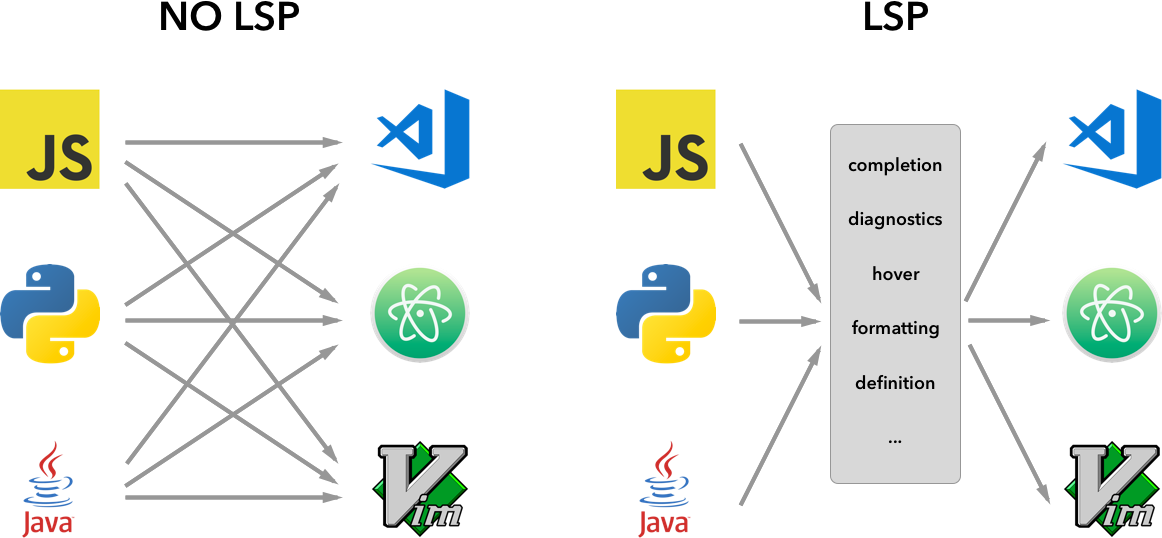
That matters because the exact same powers behind IDE features like “Go to Definition”, “Find References”, “hover type info”, “autocomplete”, and “diagnostics” can also be exposed to an AI harness. Instead of asking the model to infer code structure from raw text, the harness can ask the language server directly for the symbol, reference graph, or type information it needs.
This is the shift that matters:
grep: “Find me this string.”LSP: “Find me this symbol.”read: “Here is the whole file.”LSP: “Here is the exact definition, references, and diagnostics.”
That difference is huge.
From searching text to understanding code
With LSP, the harness stops behaving like a file dumper and starts acting more like a semantic query engine. Instead of loading entire files into context, it can ask focused questions such as:
goToDefinitionfindReferenceshoverworkspaceSymbolgoToImplementationincomingCalls/outgoingCalls
These operations return exactly what the model needs for the next reasoning step. That means:
- fewer irrelevant lines,
- fewer tool calls,
- smaller prompts,
- better grounding,
- and lower cost.
A practical example makes this clearer.
Say the agent is trying to understand this function:
1
2
3
function processPayment(userId: string) {
  // ...
}
A text-first harness might:
grepforprocessPayment- read several matching files
- dump hundreds or thousands of lines into context
An LSP-first harness can instead:
- jump straight to the definition
- fetch the exact references
- inspect the type signature
- trace inbound or outbound calls only when needed
Same task, far less context.
Why this improves hallucination and cost
Hallucination in coding agents often comes from one of three things:
- missing context,
- noisy context,
- conflicting context.
LSP helps mainly with the second and third. Because the harness can pull precise symbol-level information, the model sees less irrelevant data and is less likely to anchor on the wrong file, comment, or implementation.
This also has a direct cost implication. Karan Bansal’s write-up, echoed by follow-up posts, frames the improvement as moving from slow, broad grep-based searches to much faster semantic lookups, with some reports citing definition lookups dropping from 30 to 60 seconds to around 50 milliseconds in LSP-backed flows. Even if the exact speedup varies by language and project size, the principle holds: less context in, fewer retries out.
And there is a second-order gain: diagnostics. With LSP enabled, the harness can receive real-time feedback about type errors, missing imports, and undefined variables immediately after an edit, which helps the model correct mistakes in the same iteration instead of discovering them one or two turns later.
What changes in practice
The biggest difference is not theoretical. It shows up in everyday workflows.
With LSP-backed code navigation:
- refactors become safer because reference lookups are semantic,
- code exploration becomes faster because the agent can trace symbol relationships directly,
- edits become cleaner because diagnostics catch issues earlier,[web:5]
- and the harness stops wasting context on unrelated file content.
Antonio Cortés notes that this is especially noticeable in refactoring and in exploring unfamiliar repositories, where findReferences and symbol-aware navigation outperform recursive text search by a wide margin. That lines up with the intuitive experience many developers already have in editors: IDE navigation feels instant and reliable because it understands code, while grep only understands text.
How to apply this to your own harness
You do not need to rebuild your entire agent stack to benefit from this. A simple rule already gets you most of the value:
Use LSP for code navigation and semantic lookups. Use grep only for string and pattern search.
That means:
- prefer symbol queries over file reads,
- fetch definitions before reading a file,
- fetch references before renaming or changing signatures,
- use diagnostics after edits,
- and keep full-file reads as a fallback, not the default.
If your stack touches languages like TypeScript, Go, Rust, Python, or C#, there is a good chance the language server already exists and your harness only needs a thin integration layer to benefit from it.
For Claude code
Prerequisites:
- Claude Code version 2.0.74 or later
- LSP server for your language
Enable LSP:
Add env to enable LSP tool
~/.claude/settings.json:"env": { "ENABLE_LSP_TOOL": "1" }Install LSP for the language:
| Language | LSP Plugin | Install Command |
|---|---|---|
| Python | pyright-lsp | npm i -g pyright |
| TypeScript / JavaScript | typescript-lsp | npm i -g typescript-language-server typescript |
| Go | gopls-lsp | go install golang.org/x/tools/gopls@latest |
| Rust | rust-analyzer-lsp | rustup component add rust-analyzer |
| Java | jdtls-lsp | brew install jdtls |
| C / C++ | clangd-lsp | brew install llvm |
| C# | csharp-lsp | dotnet tool install -g csharp-ls |
| PHP | php-lsp | npm i -g intelephense |
| Kotlin | kotlin-lsp | GitHub Releases |
| Swift | swift-lsp | Included with Xcode |
| Lua | lua-lsp | GitHub Releases |
- Install and Enable the Plugin
1
2
3
4
  # first update claude plugin market place
  claude plugin marketplace update claude-plugins-official
  # To install lsp plugin use: claude plugin install <plugin_name>
  claude plugin install rust-analyzer-lsp
- Double check, your ~/.claude/settings.json or ~/.claude/settings.local.json
1
2
3
4
5
6
7
{
"env": { "ENABLE_LSP_TOOL": "1" },
"enabledPlugins": {
    "pyright-lsp@claude-plugins-official": false, # for disabled plugin
    "rust-analyzer-lsp@claude-plugins-official": true, # for enabled plugin
  }
}
- All you’re left to do is to restart claude and ask if LSP is working or not? You can also add a prompt to
CLAUDE.mdto use LSP.
cheers 🍻🍻🍻
The real optimisation layer
A lot of people think better coding agents will come only from better models. Better models help, but the bigger near-term win is often the harness itself.
If your harness keeps flooding the model with broad text dumps, even a strong model wastes time reconstructing structure that an LSP can provide directly. But if your harness passes compact, semantically relevant context, the same model becomes faster, cheaper, and more accurate.
So the real optimisation is not just model selection. It is context discipline.
And LSP is one of the cleanest ways to get there.
If you’ve come this far, help spread this human written content by sharing with you network.